Friday, April 28, 2017

Inquiry-Based Activity for Spherical Geometry

Spherical Geometry is a topic that I like to share with my Honors Geometry students, but it is very difficult to try to describe when we take notes on a two-dimensional piece of paper.  I found an activity on Twitter a while ago where people used balloons to talk about spherical Geometry.  This activity has quickly become one of my students' favorites.  

For this activity, I have each student blow up a balloon.  I also give each student a marker.  We talk about how lines in spherical geometry are "great circles" that have to pass through two opposite sides of the balloon.  We quickly discover that ALL lines in spherical geometry intersect.  We talk about Euclidean geometry where two points make one distinct line.  We draw out on our balloons how this isn't always the case in spherical geometry.  We also talk about how we can draw a triangle on our balloons that has three right angles.  


Since I had my students start drawing on balloons for this lesson, I can see that their level of understanding has greatly improved.  They also enjoy having a balloon for the rest of the day. 

Points of Concurrency Activity

In the past when we have studied points of concurrency in Honors Geometry, I have had my students construct these points with the basic construction tools: a compass and straight edge.  Many of my students run into issues with the compass and several other students don't bring the required materials with them to class.  This year, I had my students use the app "Geometry: Constructions Tutor (Lite)"  to construct an incenter, circumcenter and an orthocenter.  By using this app, students were able to construct accurate diagrams of each of these points of concurrency.  Additionally, they were able to focus more on the activity and got more out of it, rather than just worrying about whether or not they could draw a "perfect arc".

For our "centroid", I had my students construct this on a piece of cardboard.  This point of concurrency is the "balance point" of a triangle.  Students used a ruler to measure to draw in the three medians of their triangle.  They then were able to balance the triangle on the tip of a pencil.

Overall, students really enjoyed this activity and were more engaged than during the previous more "traditional" process that involved a compass and straight edge.


Class Expert Review Activity

For this activity, I wanted to create a resource for our class that students could refer to while preparing for our first unit summative assessment on the basics of Geometry.  Instead of just assigning a review packet for my students, I decided I would split it up and have different teams of students become our "class experts" on a particular problem.  I started by approaching some of the students that I knew were struggling a little bit and allowed them to choose a problem that was at their comfort level.  I approached some of my students who were ready for some more challenging problems, and I steered them in the appropriate direction.  Once the problems were assigned, I had the student teams create a video using the app "Explain Everything", where they walked through and explained the problem.

Here is an example of one problem:


I then had my students copy the link to their problem to a shared Google document and created a class library of how to solve each problem from the review.


If a student was struggling with a particular problem, all they would need to do is watch the video for a clear explanation.  Overall, this activity went pretty well.  There were some technical issues where some groups were unable to upload their video to YouTube.  However, the library of resources was fairly complete and could be used as a valuable resource.

Hands On Proof Practice with Google Slides: Angle Relationships & Proving Lines Parallel

When we first started working with proofs this year, I decided I would try to make a Google Slide document to share with my students.  For each slide, I put the proof problem with two column proof outline.  I also included some text boxes that had all the statements and reasons (and as students progressed, I included a few extra items) that they would need to complete the proof.  Students were able to drag and drop the statements and reasons into the chart in the correct corresponding place.  Students were able to work together and compare answers.

In the past, I have done this activity where I created the same activity but used strips of paper.  It ended up being very time consuming each year to do this activity since, inevitably, some of the strips of paper would get lost.


Overall, this activity went pretty well.  However, it was a little glitchy at times.  I will need to look into whether or not I can "lock" the proof table into place to prevent students from moving items that were not intended to move.

Hour of Code 2016

This year I hosted an Hour of Code event at my school.  I used some of the resources from code.org to get organized.  When I host this event, I always like to start with an "unplugged" activity.  This is an activity that allows students to think about computer programming instructions without having to know any actual language.  I chose to do "Color by Pixel" which allowed students to read and write programming instructions to color a grid to make a picture.  All of the students who attended this event had some sort of programming experiences, so we kind of flew through this activity.  


Once we finished with this, I introduced some different activity options and the students got to work.  Students could choose from Google's Blockly Maze activity, working with Scratch, creating a program using MIT App Inventor, or building an iPhone game with Swift.  Since many of the students who attended the event were enrolling in my second semester Swift programming class, most of the students chose the last option.  Students were having a great time with this and were cruising along with their apps. Unfortunately, we ran into some network issues which brought their progress to a halt.  Even with this difficulty, I think the students enjoyed the Hour of Code and were encouraged to learn more.


2016 Hour of Code Participants


Apple Teacher

Earlier this year, I attended the "Waukesha One" professional development day put on by my school district.  I attended one of the sessions led by an Apple professional.  During this session she talked about becoming an Apple Teacher.  After this professional development day, I looked into what it takes to gain this distinction.

I started viewing the training modules and was able to earn an "Apple Teacher" distinction.  Once I completed this, I was able to complete training on "Swift Playgrounds".  I have been teaching computer science for the past ten years or so and I have recently started to teach the Swift language.  I was really excited to see this as an option.  I was able to get a new iPad that was capable of running the Swift Playground app and was really impressed with its functionality.  I was able to earn the "Apple Teacher Swift Playgrounds" distinction.


Variables Gallery Walk

This semester I started to teach a new programming language, Swift.  Students seem to be able to create a basic app at the beginning of the semester, but I was worried that they didn't truly understand the fundamentals of variable creation.  To help students communicate and talk about variables, I had them break up into small groups and create a poster for their variable type (integers, doubles, boolean, String, how to check if two variables are equal, etc).  Each poster contained a description of the variable type and what this would look like with code.  The student then hung up their posters and the class participated in a gallery walk.   Many of my students decided to take pictures of these posters to keep as notes to use as a reference when they completed their next programming assignment.

Flash Cards Turned into a Game

I had my students try something a little different in preparation for our unit summative assessment on similarity.  At the end of each class period, I had students work in groups to write two problems based on the knowledge learned during the class period on the front of a notecard.  On the back of the notecard, students showed their work for how they solved their own problem.

At the end of the unit, I took the questions written by each group (and added a few more questions that I wrote) and turned it into a game.  I found a game board on Google Images that I modified and printed out on large paper, gave each student a token and provided dice for the group.  Students then played the game with their own questions.  If a group ran out of questions, I had them swap "question packs" with another group to continue.


Overall, the students really seemed to enjoy this activity and were very engaged in the activity.  Allowing students to write their own questions for this game caused them to be more engaged in thinking about the different types of problems we encountered throughout the unit.

Tuesday, January 31, 2017

Similarity in Right Triangles Station Maze

Some of my colleagues have used station mazes in their classrooms to get students moving and to have them explore problem-solving activities.  My students needed some additional practice with similarity in right triangles, so I decided to try this out.

I created 15 problems related to this concept and listed four multiple-choice answers.  Based on the answer, students were then directed to a new station.  If the students were doing their math correctly, they should have visited five stations and then returned to their original starting point.


Within the stations, I embedded two paths with multiple entry points. I created a "yellow" path and a "pink" path.  Students could start at any point of the path and it would form a complete cycle.  Other distractor questions were thrown in to turn this activity into more of a problem-solving activity.


I tried this with two of my Honors Geometry classes and it went pretty well.  My students were having good conversations about math and were really trying to complete their paths.  Students were asking well-thought-out questions when they got stuck.  Instead of focusing on the answer, most of my students seemed to be focused on the problem solving behind it.  One of my students even asked if we could do it again!  Overall I think it went pretty well, but it was kind of time-consuming to create this.  I think with some additional practice, it will become faster to create.

You can view my entire maze station activity here.

Monday, January 30, 2017

Proof Puzzles

Proofs are one of the most dreaded things in my Honors Geometry classroom.  It is difficult to start thinking about justifying each step of what you are doing in order to "prove" something.  To get my students started thinking about proof, I use the "Peanut Butter and Jelly Activity".


I give my students pieces of paper in an envelope with the steps listed for making a peanut butter and jelly sandwich.  I then have them put the steps in order that would successfully create the sandwich.  Once we agree upon an order, we talk about how the ingredients are like the "given" information in a proof and how the sandwich is what we are trying to make, or what we are trying to "prove".  There is a logical order in which the steps get us from the ingredients to the sandwich, but sometimes we have some flexibility in this.  

In order to continue guiding my students along, I have put together "proof puzzles".  In order to create this, I write out a two-column proof.  I then cut apart the statements and reasons.  It is the students' job to reorganize the proof into a valid logical argument.  Once they get the hang of this, I start adding in some distractor statements that are not necessary to add to the proof or might lead to an invalid logical argument.  It gets the students thinking about the necessary steps and they start to evaluate their thinking.  I call these "proofs with training wheels" and I have found it helps students to start moving in the right direction.


Polygon and Quadrilateral Detectives in Training

Gaining Better Understanding of Quadrilateral Characteristics

I don't know what it is, but my students have always had trouble keeping the characteristics of quadrilaterals in order.  It could be that we usually go through this unit right before winter break and the students might be completing focused.  It gets even more difficult for students once we try to take our quadrilaterals to the coordinate plane and try to determine what our figure is based on its coordinates.


A colleague and I were searching for an activity to help increase student understanding of this topic.  We found a couple of cool-looking activities online, but nothing that totally fit our needs.  Based on what we found, we created our own activity called Polygon and Quadrilateral Detectives in Training.

In this activity, students had to graph a quadrilateral on the coordinate plane.  Students had to abide by some parameters in order to keep this from being too easy.  For example, students could not include more than one horizontal and one vertical line in their shape.  It would be too easy to just look at a shape to see those right angles that line up perfectly with the grid lines on the graph.

They had to use the properties that we had been learning about in class in order to correctly identify the coordinates for their shape.  Then, they listed a couple of ways that people could verify the name of the graphed shape.

The next day, groups switched figures.  The groups needed to use the slope formula, distance formula, and midpoint formula in order to discover the properties associated with their shape.  They were then able to appropriately give the figure a name.  Once this was done, students check with the answer key.  If there was a discrepancy, the two groups had a conversation to figure out the correct solution.

Overall, I think this activity helped increase understanding for most of my students.  When it was time for our summative assessment, students were better able to identify figures and were able to use the formulas to support their answers.  

ClassKick

Image result for classkick
Getting Feedback via ClassKick

One app I started using in my classroom this year is ClassKick.  I heard about this app a while back but I was reintroduced to it during some summer professional development training.  This program allows me to enter an assignment and then view my students' work.  The students can raise a virtual hand in order to get help or to ask the instructor to check an answer.  I have used this app before several of my summative assessments this year in order to give students more time to get help and receive feedback on their work.  Generally, I will run a "ClassKick" session on the night before a unit summative assessment for an hour or so.  These sessions haven't been as highly attended by students as I had initially hoped for, but I believe the students who attended got some much-needed one-on-one attention and were able to ask questions in order to gain a better understanding of the concepts we had been learning about in class.

With our most recent summative assessment, I tried to kick it up a notch.  Early in the week I had my students choose a problem to work on.  The students created a video using Explain Everything in order to walk us through the problem-solving process.  The students then uploaded these videos to YouTube and shared them in a Google Document.  I was able to take these videos and attach them to our summative review in ClassKick.  While students were working on the review and got stuck, they could view the video created by their classmates.  We had essentially created a class library of problem-solving strategies for the main concepts that we had talked about in class.  If students were still stuck on the problem, then they could raise their hand and get additional assistance.

I know there is also a feature in ClassKick that allows students to be able to work together and answer questions without solely relying on the teachers' expertise.  This is something that I would like to explore in future review sessions.

Wednesday, June 15, 2016

Communication Between Student and Teacher: I Need Help!

Help Notification

While at the Mobile Makers teacher training academy, I was re-introduced to a method for students to communicate with teachers.  They suggested the use of three colored indicators: green, yellow, and red.  The idea is that students can work independently on a project.  If the student gets stuck and cannot continue without help, they display the red indicator.  This lets the teacher know they need to give the student attention soon.  If a student dispays the yellow indicator, this communicates that the student needs help or has a question but can still continue with their program for a while.  If a student displays the green indicator, this communicates that the student is finished.  Students who complete a task and display the green indicator can then go assist other students who display a red or yellow indicator.

As far as the indicators go, in class we've been using foam balls (think red and green clown noses) that can be hooked on to the edge of a computer monitor.  The instructor, Brian Mathien, shared with us that he uses different colored clips that the students can hook on the edge of their computers.  I have heard of this technique while at another education conference and the students displayed different colored cards.

I think this is a great technique and I plan to use it in my programming class.  I would also like to use this in my math classes.  I see it as a great way for the students to give feedback about their current level of understanding.  It also allows the teacher to focus more attention where it is most needed.

Tuesday, June 14, 2016

Introducing a New Programming Technique: Driver and Navigator

One of the things that I learned about while at the Mobile Makers teacher training academy in Chicago was a new technique for learning about programming.  In the past when I taught a new programming concept, I would talk a little bit about it and then show the students how to apply it.  The students would then copy down my code onto their own computers to see if it works.  I often found that I might be going too fast for some of my students.

A new technique that I learned about assigns different roles for students in order to keep students more engaged and to help increase student understanding.  Rather than typing in the sample code myself into the display computer, I could assign one student to be a "driver" for the example.  While this student is "driving", all other students would need to turn away from their devices and pay attention to the app creation.  My role would then be to "navigate" this student through how to create the app.  This would cause me to verbalize my thinking more and could give students more insight into what they are doing and why.  This also would dramatically slow down my explanation.  Once the "driver" has completed a few lines of code, I would then ask the rest of the class to turn back to their devices and recreate the code we wrote together.  We would continue this pattern of watching the "driver" and then trying the code on their own.


This technique can also be applied when students are working together.  Students can work in pairs where one is the driver and the other is the navigator.  The driver is the only student who can touch the keyboard.  The navigator dictates the next steps to take.  The students switch roles often so that both are contributing to the problem-solving process and one student doesn't take over.

Mobile Makers Teacher Academy: Pre-Course Work

This week I began my two-week training at Mobile Makers in Chicago to learn the Swift programming language.  My school district would like to encourage more students to get involved with computer science.  They looked into several different options, and we decided that since we are a 1:1 iPad school district, we would like to teach our students how to program for iOS devices using the Swift programming language.

Before arriving at the training program, we were asked to complete some pre-course work.  Through this pre-course work, we were exposed to some of the syntax and structures associated with the Swift programming language.  During this work, I read through some different resources, watched some screencasts, and completed two apps.


Hello World

The typical introductory program for someone learning a new language is the "Hello World" app.  The app requirements allowed me to create some different text fields, labels, buttons, and images.  Through this app, I was able to work with variables and I learned to how to create a link between items in the storyboard (text fields, labels, etc) with the code.


Multiply

The second app for the pre-course work was called "Multiply".  In this app, I was able to create a simple calculator.  The app user is able to type in two numbers and choose to add, subtract, multiply or divide.  Based on the answer, a different picture appears.  This app introduced me to concepts such as the segmented controller and the syntax of a "switch" case.  The switch case allowed me to efficiently calculate the sum, different, product or quotient based on which segment was selected in the segmented controller.


Wednesday, September 10, 2014

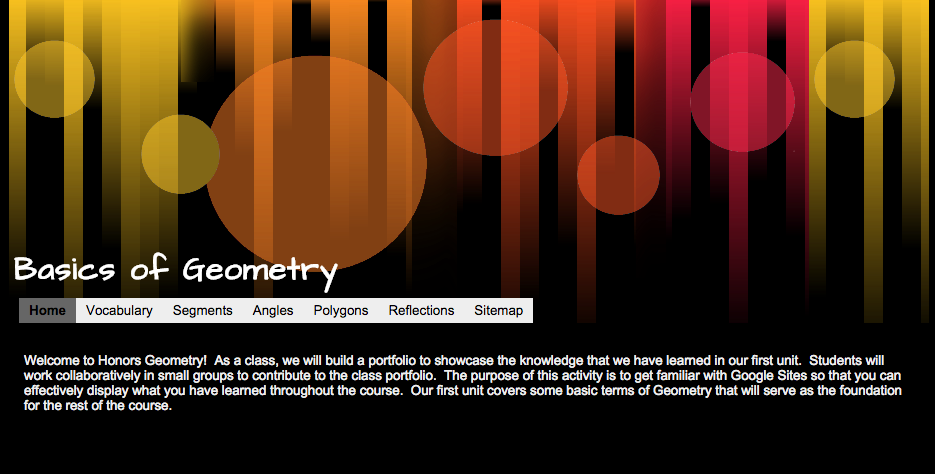
Class Review with Google Sites

This summer I took a read for credit class called "Teaching on the Education Forefront".  In this class I learned a lot about blended and online classes.  One of the activities described in the textbook was to have students create a website together.  I decided to have my Geometry students create a Google
Site to review all of the important concepts that we have learned about in our first unit on Basic Geometric terms.

I set up a website template through Google Sites earlier this summer and shared it with my students this week.  I split my class into seven groups and assigned a few concepts to each group.  As the different groups were working on the shared site, students found that they were overwriting each other's work.  As far as we could tell, it was only safe for one student to add to a page at a time.  Otherwise, not all content was added to the site.  I had to go back to the drawing board.  Instead of having students add their content directly to the website I instead created a series of Google Documents filled with tables that I embedded into the site.  Multiple users are able to type into the document at once, creating a truly collaborative experience.

The groups were responsible for reviewing different vocabulary terms.  Each vocabulary term needed to include a technical definition, the definition in student friendly terms, and a picture.  Additionally, students were asked to write sample problems and work them out through a video created through the Explain Everything app.  This was our first time using Google Sites in class as well as the first time many of my students have used the Explain Everything app.  Overall, students seemed to enjoy this activity.  It is my hope that students will use this site as a reference as they prepare for our upcoming summative assessment.


Geometric Vocabulary with TPR

In August I attended Waukesha's Personalized Summer Institute.  While at the summer institute I attended a class in Metalinguistics.  In this class I learned about TPR activities: Total Physical Response.  In these activities, students physically act out new vocabulary in order to improve recall and comprehension.  As I started to think about how I could use this type of activity in my math classroom I immediately thought of the basic vocabulary that I need to teach my Geometry students at the beginning of the year.  I came up with a series of movements that would help my students better understand basic Geometric terms and labeling conventions.  I created actions to go along with terms such as Point, Line, Plane, Collinear Points, Ray, different ways to classify angles, as well as a few others.  You can check out some of the symbols in my TPR presentation that I have posted online:


I wasn't sure how my students would respond to this activity, but they seem to enjoy it.  I have lead my classes through the TPR activity several times and have even had a few students volunteer to lead to the group.  It is my hope that this activity will increase student understanding of our basic Geometric concepts when we take our first summative assessment.


Thursday, February 13, 2014

Programming with MIT App Inventor

This semester I'm taking a new approach to my Fundamentals of Programming class.  After talking with a colleague from another school, we decided that we needed to revamp our Computer Science program.  We needed to find a "hook" to get students interested in the possibilities of programming without getting overwhelmed by the code.  Over the summer I heard about a program called "MIT App Inventor" that offered a highly visual and block-based code.  Students are able to create a basic app for an Android device within one class period....plus the program is FREE!  We're almost three weeks into the semester and things are going pretty well.

The first app we tackled was the "Hello Purr" app.  It's pretty basic, as far as apps go, but the students are pretty excited to be creating their own functional apps.  (Not many of my students own Android devices, so they're not overly excited.  But their excited nonetheless.)  Students create a button that looks like the picture of a cat.  When the button is tapped, a "meow" sound plays and the phone vibrates to simulate purring.  When the phone shakes the same "meow" sound plays.  Students can test of their app on their own Android device or use the emulator.  This app, while very basic, has opened the door to important discussions about properties, variables, events, and event handlers.  When I taught this class in the past as a strictly code-based class in Java, it took us weeks before we could talk about variables and much longer before we were able to create and define our own event handlers.  Now, we're broaching the subject within the first week of class.

To go along with the class, students are creating a Google Site portfolio to house all of their apps.  They include screen shots of the visual design of the app, a peek at the blocks of code, a brief description of their app, and a QR code so that people that visit their site can download the app to their Android device.  The site also contains information about some of the terms and concepts we've learned about while creating the app.  Students will create and maintain this site throughout the semester.

While making the transition to this new program we've run into some glitches.  Only a few students are able to get their "emulator" to work.  We're still working on these issues and we hope to have them resolved shortly.


Tuesday, January 21, 2014

Students Lead the Class

In preparation for our Honors Geometry semester exam I had students break up into small groups
to become the "class experts" for one of the topics we learned about during first semester.  The groups chose their topic and then were responsible for creating a quick reference guide for the content, a practice summative assessment with answer key, and a twenty minute review activity for the class.

The students were given four class periods to put together their projects.  Things moved along very well and students definitely took ownership in their learning.  Students learned to anticipate the types of questions that they may find on the exam and then designed an activity to review the concepts.

I must admit that I was a little nervous when it was time for the students to start their activity presentations.  I would be turning over the classroom to my students for three entire class periods.  I knew that my students had put a lot of work into their activity and I had a pretty good idea of what each group would be presenting, but the groups were entirely in control of the classroom.  The students made the decisions about what should be emphasized in preparation for our semester exam.  I was nervous, but I was also very curious as to how they would take charge.

Overall, things went GREAT!  My students came up with some really great activities to keep their classmates engaged!  We played Jeopardy, BINGO, a math variation of "spoons", played various board games, and created many other activities.  The leading group took charge of the classroom and the rest of the students busily got to work on the activities.

The vast majority of the questions posed were great.  Students made sure to cover the basics of the material and also posed great challenge questions.  Students also created summative assessments for their classmates so that the review could continue outside of the classroom.  Again, I saw lots of great questions that I think will get my students ready for their upcoming exam.  While not all of the projects and questions were "perfect", I think even the mistakes helped to teach.  If the class tried to solve a problem that didn't have a solution, they had to look at it a second time and determine why the problem couldn't be solved.  If there was a problem with an answer key, students talked about it and challenged it rather than accepting the solution as fact.

I would definitely do this project again in the future.  I think it taught my students to think critically and it helped them prepare for our upcoming exam.


Tuesday, January 7, 2014

Group Project: Review for our Semester Exam

This year I'm trying something a little different with my Honors Geometry students to help them prepare for our semester exam.  We'll be turning the tables and the students will become the teachers.  In order to prepare for our exam students will break up into small groups of four or five students to become the "experts" on one of the topics that we covered throughout the semester.  The group will then will be responsible for preparing the material to help us review.

Each group will be responsible for putting together three items for their assigned topic:

  1. Summary of the content for the topic
  2. A review activity that will be presented to the class
  3. A practice summative assessment, with answer key
The idea is that once the students have compiled all of their content, they will all be housed on a class Google Site so that students can access the material as they prepare for the exam.

Summary of the Content
It is up to the group to decide what is important about their topic.  They will also decide the best method to present their information.  Students can create a quick reference guide using a Google Document, a series of videos using the app "Explain Everything", a Google Presentation, or another method of their choosing.  This content will be housed on the class Google Site.

Review Activity
The group will be in charge of leading a group activity for the class during a 20 minute time slot.  The intent is not to have the students lecture, but instead guide the students through an exercise.  I gave the suggestions of creating a game, setting up stations, leading a "think-pair-share" activity, or another activity of their choice.

Practice Summative Assessment
Students will also need to create a practice summative assessment, with answer key, for their content.  This practice assessment will be assigned to the class as their homework for the evening.  It will give students another opportunity to practice the material.  

It is my hope that this activity will help my students prepare for a major test.  Since the majority of my students are freshmen this will be their first experience with taking a major math exam.  I wanted to lead my students through good study habits.  We are starting this activity well before our actual exam---we are not cramming it all in with only a day or two before the exam.  I also want to teach my students to anticipate the types of questions that might be on the exam.  By creating their own test, hopefully students won't find any surprises.